No over complicated tool need to track changes you make on your website. 💡 Listen in for the simplest way to keep track of your changes.
Resources
- Podcast Guest Live Workshop
- Analytics Clarity Package
- Tool of the Week – AI Powered Reels Club
- Recommended Podcast 👉 The REAL Numbers of Podcast: Time, Money, Energy, Possibility by Emily Aborn on Content with Character
Listen on Spotify
Listen on Apple
With so many pages on my website and my clients’ websites, I need to have a way to keep track of updates I’ve made so I can see what works or doesn’t and what else I can do.
🤗
When I make a change to a page like a page title or meta description, I used to make note in a notes column in my keyword map.
A keyword map is a Google sheet where I keep all my website URLs, their intended keyword and some other information.
But putting the changes in this way didn’t allow for me to easily see what happened on what day. And sometimes the notes got way long making the sheet super messy.
I tried keeping changes in individual tasks in my task manager tool. But it felt clunky trying to figure out what the changes where, when I made them, again just messy.
Now I use a system that I love!
For every blog post on my website, I put a link in the keyword map to the Google doc that has the copy from my copywriter.
I call it… The Doc.
(Clever, no? 🤪)
Here’s a screenshot…
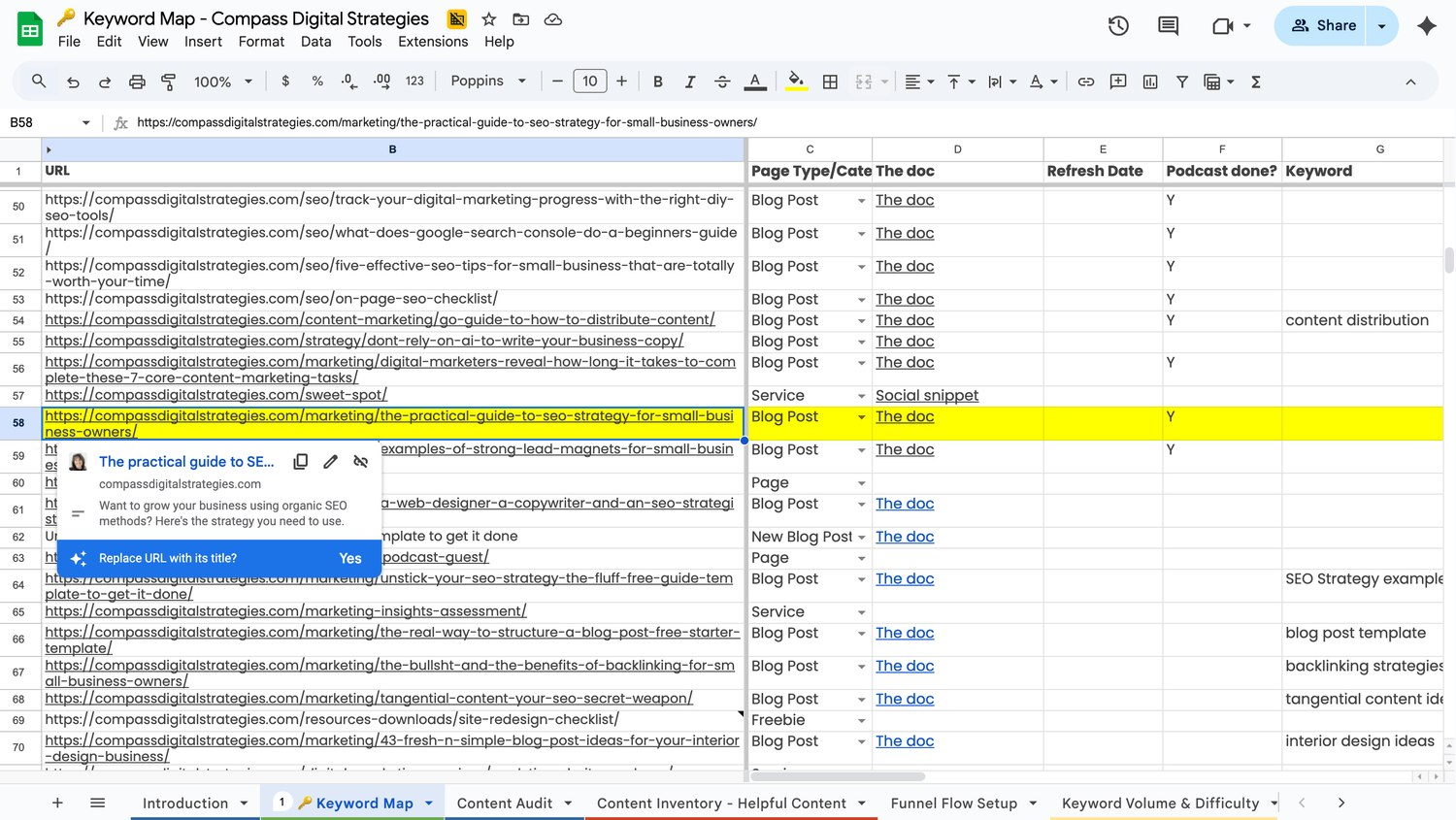
The Doc has the copy, the page title and meta description and a section that has optimizations.
I put the optimizations in a tab and whenever I do optimizations, I put the date and the current stats, like what position it is in google, clicks to the website and conversions.
(Google docs allows you to add tabs to keep content sort of in chapters or buckets. The sad news is when you go to print, you have to print each one separately. Otherwise, it’s been a great organizational tool for me.)
Theeeen, most of the time (still working on making this consistent), I put an annotation (a note) in Google Analytics.
This feature came out in GA4 in March 2025. And it’s the most helpful thing!
There are two ways to view them, one is seeing the icon in the chart area, as it has a date view. And the second is in the admin area as a list.
Google gives you the option to apply color coding, so you can blue for copy changes and purple for meta data changes, or whatever, but you can’t sort by them. Oh, Google. 😑
So you may want to implement a descriptive naming convention if you find you’re annotating a lot.
And you can either set the annotation for a single day or a range of dates.
💡 Something else I’ve put in my GA4 annotations is when I make changes to outside marketing that affects my website.
Examples:
- Updated IG bio description
Now, I know that IG shows you the clicks to your website in their analytics, but! It can’t tell you if those visits took action on your website, like signed up for a newsletter or downloaded a thing. Only GA4 can tell you that. - Significant copy changes to a page like a homepage
- Website rebrand
- Paid ads campaigns
How and what you annotate is really going to be your personal preference.
The Takeaway
If you’re not using annotations in GA4 yet, now’s the time to start!
It’s a simple way to track your website’s key changes so you can make informed decisions.
How to Read Google Analytics in Under 5 Minutes a Week
Next Up
If you want to make the most of your GA4 annotations, check out my episode How to Read Google Analytics in Under 5 Minutes a Week. You’ll learn three simple ways to use GA4 and track what actually matters without wasting time.